
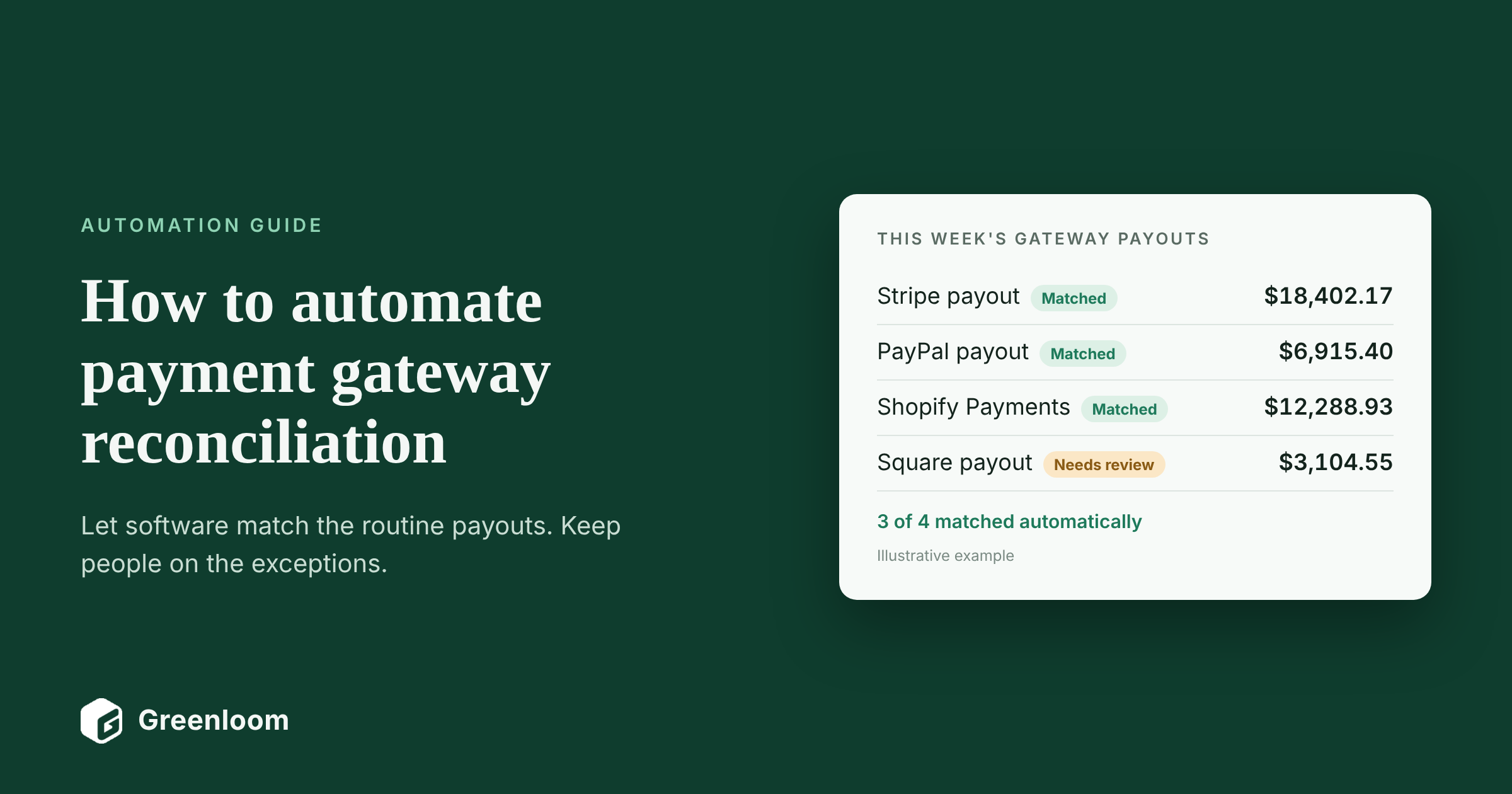
Most finance teams start reconciling payment gateways in a spreadsheet: export the Stripe payouts, export the bank statement, look up each one. It works until you add a second gateway, a marketplace or a few thousand orders a month. Then the spreadsheet takes days, small differences pile up, and the close waits on them.
This guide shows how to automate payment gateway reconciliation, step by step: the four ways to do it, the matching and posting rules you need, what should stay with a person, and how to measure whether it's working. It's written for controllers, accounting managers and finance operations leads at US businesses taking payments through Stripe, PayPal, Shopify, Amazon or a card processor. It builds on our guide to payment reconciliation and draws on Greenloom's work with 45 finance teams and more than 2,400 real payout mismatches.
Payment gateway reconciliation definition
Payment gateway reconciliation is the process of matching the transactions and payouts reported by a payment gateway, such as Stripe, PayPal or Shopify Payments, to the sales recorded in your ERP and the deposits in your bank, and explaining every difference. Automating it means software pulls the data, applies matching and posting rules every day, and sends only the exceptions to a person.
Key takeaways
- Automate the data first: pull gateway payout reports, bank transactions and ERP sales on a schedule, not by hand.
- Match on IDs, not amounts: transaction IDs link sales to the gateway, payout IDs link the gateway to the bank.
- Write posting rules for fees, refunds, chargebacks and reserves, so the right entries are proposed every time.
- Keep a person in the loop for exceptions and approvals. Automation should shrink their list, not remove their sign-off.
- Test on a month you've already closed and run one close in parallel before you switch off the spreadsheet.
In this guide
- Why does manual payment gateway reconciliation break down?
- What are the ways to automate payment gateway reconciliation?
- How do you automate payment gateway reconciliation step by step?
- What matching rules does automated gateway reconciliation need?
- What should stay with a person?
- Should you build or buy payment gateway reconciliation automation?
- How do you measure whether the automation is working?
- What are the most common mistakes?
- How does Greenloom automate payment gateway reconciliation?
- Frequently asked questions about automating gateway reconciliation
- Sources
Why does manual payment gateway reconciliation break down?
Manual payment gateway reconciliation breaks down because every gateway pays net, in batches and on its own schedule, so each payout has to be rebuilt from hundreds of lines before it can be matched. The work grows with every order, gateway and sales channel you add.
- One payout, hundreds of sales. No single sale equals the deposit, so matching by amount fails every time.
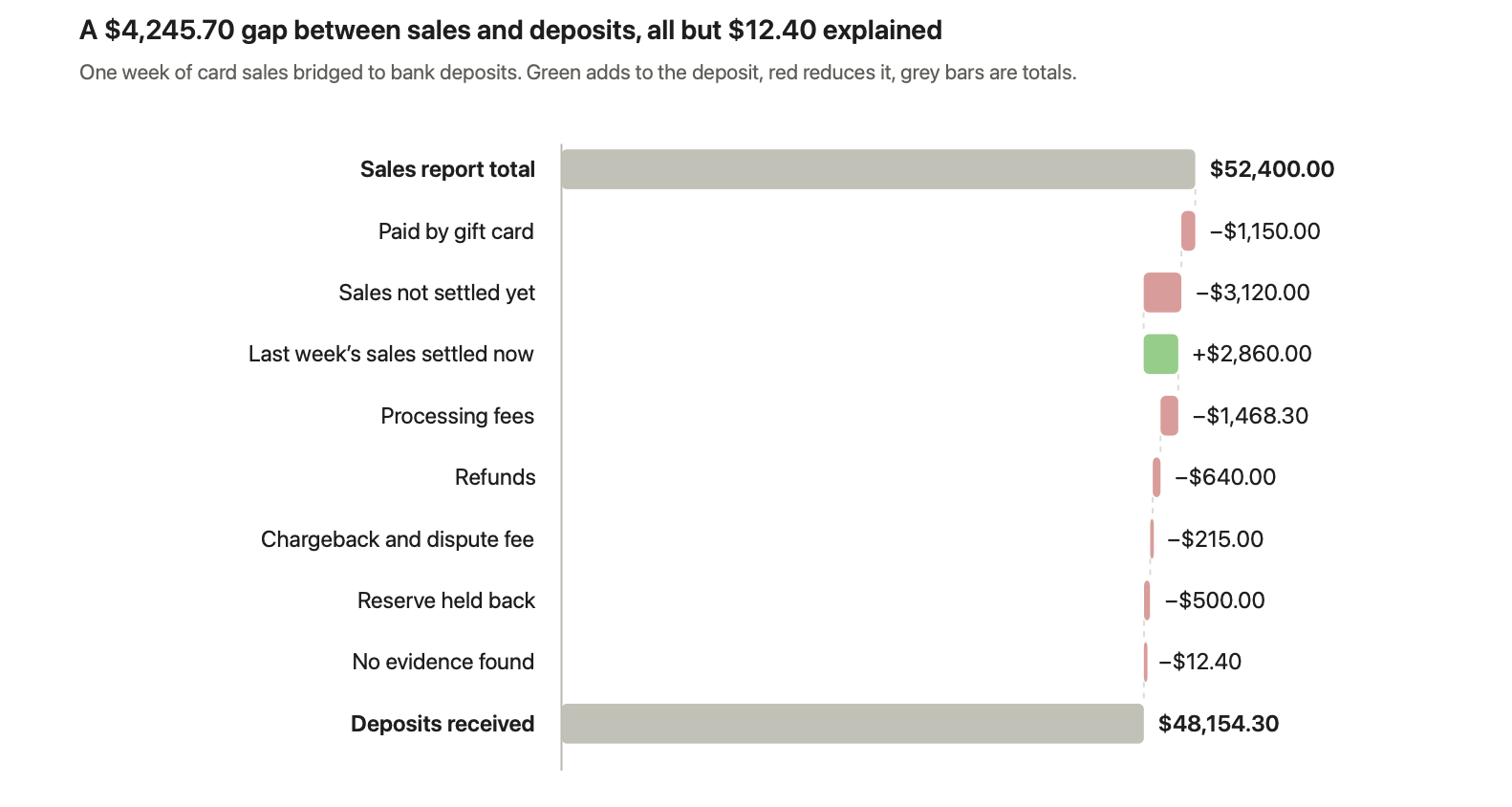
- Deductions inside every payout. Fees, refunds, chargebacks and reserves come out before you're paid. Stripe notes that refunds, disputes and fees come out of the same balance that funds your payouts.
- Timing across periods. Sales at the end of a month are often paid in the next one, and refunds land in a later payout than the sale.
- A different format per gateway. Stripe, PayPal, Shopify and Amazon each report in their own columns and IDs.
- Exports go stale. A spreadsheet is a snapshot. By the time it's reconciled, new payouts have arrived.
If you're not sure why your payouts and sales differ in the first place, start with why payment settlements differ from sales reports.
What are the signs you should automate?
- You take payments through two or more gateways or marketplaces.
- Someone spends hours each week exporting payouts and rebuilding them in a spreadsheet.
- Your gateway clearing accounts carry balances nobody can fully explain.
- Fees are booked as one net figure, and nobody checks them against your contract.
- The month-end close waits on payout differences.
What are the ways to automate payment gateway reconciliation?
There are four ways to automate payment gateway reconciliation: bank rules in your ERP or accounting software, connector apps that sync gateway payouts into your books, custom scripts built on gateway APIs, and dedicated reconciliation software. They differ in how much of the work they take on.
Approach | What it automates | What it leaves to your team | Best fit when |
|---|---|---|---|
Bank rules in your ERP or accounting software | Matching bank lines to items already in the ledger | Breaking payouts into fees, refunds and chargebacks; anything without a clear reference | One gateway, low volume, few refunds |
Gateway-to-accounting connector apps | Posting each payout to your books, often as a summary journal entry | Matching to the bank, checking the summary, investigating differences | You mainly need payouts booked, not investigated |
Custom scripts on gateway APIs | Pulling payout and transaction data; simple matching | Building and maintaining the logic, every format change, exceptions and audit trail | You have engineering time and a single, stable gateway |
Reconciliation software | Pulling data, matching sales, payouts and deposits, breaking out every deduction, routing exceptions, logging approvals | Reviewing exceptions and approving entries | Several gateways or channels, growing volume, an auditor to satisfy |
Gateways make the data side easier than it used to be. Stripe makes its reports available through its Reporting API as well as the Dashboard, and PayPal's Transaction Search APIreturns your account's transaction history, up to 31 days per request. The harder part is everything after the data arrives: matching, explaining and approving.
How do you automate payment gateway reconciliation step by step?
To automate payment gateway reconciliation, map where your money flows, set up a clearing account per gateway, connect the gateway, bank and ERP data, then write matching rules, posting rules and an exception workflow, and test it on a month you've already closed. Here are the eight steps in order.
- Map your money flows. List every gateway, marketplace, bank account and currency, and the ERP accounts each one touches. Note which sales channels feed which gateway.
- Set up a clearing account per gateway. Book sales into it at the gross amount and payouts out of it. When everything is reconciled, it returns to zero.
- Use automatic payouts where you can. Stripe recommends automatic payouts because they keep the link between each transaction and the payout it's included in. With manual payouts, that transaction-level detail is lost.
- Connect the data feeds. Pull gateway payout and transaction reports, bank transactions and ERP sales automatically every day, through APIs, connectors or scheduled report downloads.
- Standardize the records. Put every source into the same fields: date, amount, currency, transaction ID, order ID, payout ID and type (sale, refund, fee, chargeback, reserve).
- Write the matching rules. Match sales to gateway transactions by transaction or order ID, and payouts to bank deposits by payout ID, amount and date, with small tolerances for timing.
- Write the posting rules and exception workflow. Decide how each type of difference is booked, who owns exceptions, how old they can get, and who approves entries before they post.
- Test, run in parallel, then go live. Run the automation on a month you've already closed and compare the result with your manual reconciliation. Then run one live close in parallel, and switch over one gateway at a time.
Steps 6 and 7 decide whether automation saves time or just moves the spreadsheet into software. The next section shows the rules most teams need.
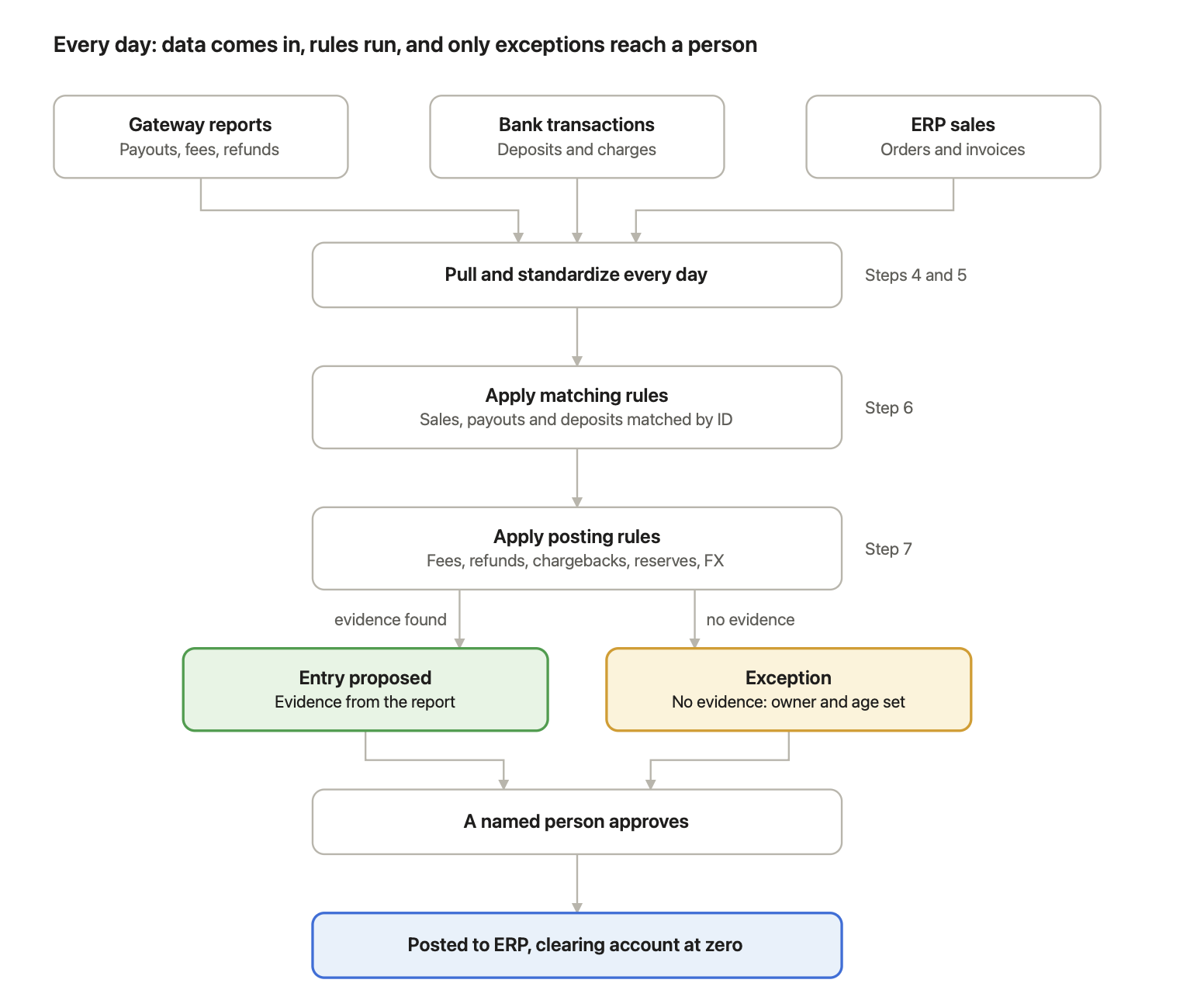
Once the rules are set, the daily run needs a person only for exceptions and approvals.
What matching rules does automated gateway reconciliation need?
Automated gateway reconciliation needs one matching rule for each link between your records: sale to gateway transaction, transactions to payout, payout to bank deposit, and each refund, chargeback and reserve back to where it started. Matching on IDs instead of amounts is what makes these rules reliable.
Rule | What it matches | Matches on | Type of match |
|---|---|---|---|
Sale to gateway transaction | An order in your ERP to its charge in the gateway | Order ID or transaction ID | One-to-one |
Transactions to payout | Every charge, refund and fee to the payout that settled it | Payout ID | Many-to-one |
Payout to bank deposit | A payout to the deposit in your bank | Payout ID, amount and a date window | One-to-one, or one-to-two for split payouts |
Refund to original sale | A refund to the sale it reverses, even in another period | Original transaction ID | One-to-one |
Chargeback to original sale | A dispute, and its fee, to the sale it reverses | Charge or dispute ID | One-to-one |
Reserve to release | Money held back to the payout that releases it | Reserve or balance transaction ID | One-to-one |
The transaction-to-payout rule is the one that turns a net deposit back into its parts. For a deeper look at one-to-many and many-to-many matching, see our page on transaction matching software.
What posting rules should you set for fees, refunds and chargebacks?
Posting rules tell the system which entry to propose for each kind of difference, so every payout is booked the same way. A common setup using one clearing account per gateway looks like this:
Difference | Debit | Credit | Evidence the rule needs |
|---|---|---|---|
Payout received | Bank | Gateway clearing account | Payout ID on the bank line |
Processing fees | Payment processing fees (expense) | Gateway clearing account | Fee lines in the payout report |
Refunds | Sales returns and refunds | Gateway clearing account | Refund line with the original transaction ID |
Chargebacks and dispute fees | Chargebacks, and dispute fees (expense) | Gateway clearing account | Dispute line with the original charge ID |
Reserve held back | Gateway reserve receivable | Gateway clearing account | Reserve line in the payout report |
Currency difference | FX loss (or credit FX gain) | Gateway clearing account | Conversion rate and line in the report |
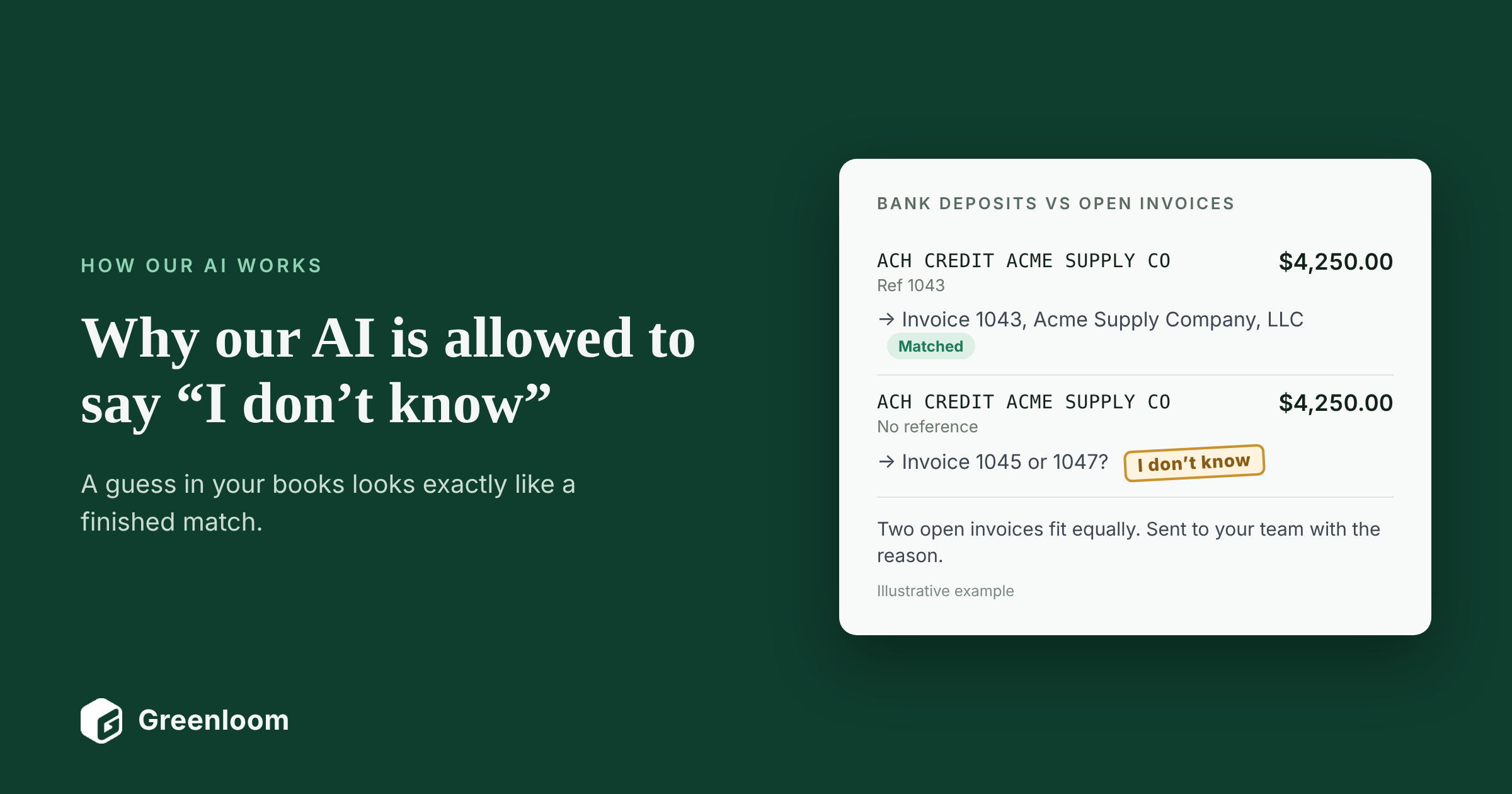
Your accountant may use different account names, and should confirm how chargebacks and reserves are treated in your chart of accounts. What matters is that each rule needs evidence: a line in the gateway report. A difference with no line behind it should never be posted as a fee.
See this on your own payouts.
Bring one month of gateway, bank and sales data. In a 30-minute call, Greenloom runs these rules live and shows you every match, posting and exception. Then use it free for 20 days. No card needed.
Reconcile my worst month live →
What should stay with a person?
Approvals, exceptions and judgment calls should stay with a person, even when everything else is automated. Automation should shrink the list your team reviews, not remove their sign-off.
- Approving entries before they post. Proposed entries should wait in a queue until a named person approves them.
- Exceptions with no evidence. If no line in a report explains a difference, someone needs to find out why.
- Disputes and write-offs. Whether to fight a chargeback, or write off a small balance, is a business decision.
- Fee disputes with a gateway. Software can flag fees above your agreed rate. A person raises them.
- New situations. A new gateway, currency or payout type needs a person to set the rules first.
For US public companies, this matters for controls too. Section 404 of the Sarbanes-Oxley Act requires management to maintain and assess internal control over financial reporting, and auditors look for a named reviewer on reconciliations, automated or not.
Should you build or buy payment gateway reconciliation automation?
Build it if you have one gateway, stable formats and engineering time to maintain it. Buy software if you have several gateways or channels, growing volume, or an auditor who needs a clean trail.
Build with scripts and APIs | Buy reconciliation software | |
|---|---|---|
Time to first result | Weeks of development | Days, often on your own data in the first meeting |
Gateways covered | The ones you build for | The ones the vendor supports, plus uploaded reports |
Breaking out fees, refunds and chargebacks | You write and test each rule | Built in |
Format changes | Your engineers fix them | The vendor maintains them |
Exceptions and approvals | You build the workflow | Built in, with owners and an audit trail |
Ongoing cost | Engineering time | A subscription fee |
Before you choose a vendor, ask which gateways it reads on day one, whether it breaks payouts into their parts, whether it checks fees against your agreed rate, whether anything can post without approval, and how your data is stored and used.
How do you measure whether the automation is working?
Measure it against the last few closes you did by hand. Five numbers tell you most of what you need:
Measure | What it tells you |
|---|---|
Share of payouts matched automatically, and how it's counted | How much routine work is gone |
Open exceptions and their age at month end | Whether the queue is shrinking or just moving |
Unexplained balance in each gateway clearing account | Whether the books actually tie out |
Days to close | Whether gateway differences still hold up sign-off |
Fees recovered from gateways | Money the automation found for you |
Ventana Research found that 53% of companies complete their monthly close within six business days. Use your own baseline rather than an industry average, and track it close by close.
What are the most common mistakes?
- Booking net payouts as revenue. It hides fees and makes every later reconciliation harder.
- Matching on amounts instead of IDs. Two payouts of the same amount get swapped, and nobody notices.
- Automating the data but not the differences. If fees and refunds are still worked out by hand, the spreadsheet hasn't gone anywhere.
- Letting rules post without review. One wrong rule can post hundreds of wrong entries before anyone looks.
- Assuming every gap is a fee. A difference with no line in the report is an exception, not a cost of doing business.
- Skipping the parallel run. Compare automated results with a month you trust before you rely on them.
Keep your ERP. Lose the spreadsheet.
Greenloom connects to your banks, Stripe, PayPal, Shopify and Amazon, reconciles every payout to your ERP daily, and sends your team only the exceptions to approve. No ERP changes. Try it free for 20 days on your own data. No card needed.
How does Greenloom automate payment gateway reconciliation?
Greenloom automates payment gateway reconciliation by pulling your gateway, bank and ERP data every day, matching every payout to its sales and deposit, explaining each difference from the gateway's own report, and sending your team only the exceptions to approve. It runs alongside your ERP and is used by 45 finance teams.
- Connect. Banks, Stripe, PayPal, Shopify and Amazon. You can upload statements on day one. No ERP changes.
- Match and explain. Every payout is matched to its sales and its deposit, with each difference named: which fee, which refund, which chargeback, which reserve, which payout came in late or was split.
- Approve and post. Your team clears a short queue. Only approved entries post to your ERP.
What Greenloom does
- Reconciles every payout, every day, not a sample.
- Breaks short payouts into fees, refunds, chargebacks, withholding tax, bank charges and FX.
- Flags fees above the rate you agreed.
- Holds duplicate, late and split payouts, and says why.
- Keeps an audit trail of what matched, what was held, who approved it and when.
What Greenloom does not do
- It doesn't assume a fee exists just because two amounts differ. Without evidence, the item stays open for a person.
- It doesn't post an entry without a yes from your team.
- It doesn't replace your ERP or your gateways' own reports.
See the full feature list on our payment reconciliation software page.
Bring your worst month. We'll reconcile it live.
Book a 30-minute call. We load one month of your gateway and bank statements, and you see what matches, what doesn't, and why. Then use Greenloom free for 20 days on your own data. No card needed, and we reply within one business day.
Frequently asked questions about automating gateway reconciliation
Can payment gateway reconciliation be fully automated?
Most of it can. Data collection, matching and breaking payouts into fees, refunds and chargebacks can run automatically every day. Exceptions without evidence, approvals, disputes and write-offs should stay with a person.
What data do you need to automate gateway reconciliation?
You need three sources for the same period: sales or orders from your ERP, payout and transaction reports from each gateway, and your bank transactions. Each record should carry a date, amount, currency and IDs such as order, transaction and payout ID.
How do you match Stripe payouts to bank deposits automatically?
Use automatic payouts, pull the payout reconciliation report or balance transactions for each payout, and match each payout to the bank deposit by payout ID, amount and date. The report lists every charge, refund and fee inside the payout.
Can QuickBooks or NetSuite reconcile payment gateways automatically?
They can match bank lines to entries already in the ledger using rules. They usually need help breaking a net payout into its sales, fees, refunds and chargebacks, which is where a connector or reconciliation software comes in.
How long does it take to automate payment gateway reconciliation?
It depends on the approach. Custom scripts can take weeks to build and test. Reconciliation software can often show results on your own data in the first meeting, followed by a parallel run over one close before you switch over.
What is a gateway clearing account?
A gateway clearing account is a holding account in your ledger for money between the sale and the payout. Sales are booked into it, payouts and deductions are booked out of it, and it should return to zero once everything is reconciled.
How often should automated gateway reconciliation run?
Daily. Most gateways pay out daily or several times a week, and differences are much easier to explain while they're a day or two old.
Is automated payment gateway reconciliation audit-ready?
It is when every match and entry links to the gateway or bank line behind it, a named person approves what posts, and the full history is available to your auditor.
About the author
Siddika Shaikh is CEO and Co-founder of Greenloom, AI reconciliation software that matches bank, gateway and marketplace payouts to a company's ERP every day and sends finance teams only the exceptions. More articles by Siddika
Sources
- Stripe Docs, Reporting and reconciliation
- Stripe Docs, Balances and settlement time
- PayPal Developer, Transaction Search API
- U.S. Securities and Exchange Commission, Sarbanes-Oxley Section 404: A Guide for Small Business
- Ventana Research, Best Practices for a More Effective Close
Updated


Comments
Join the conversation and share your thoughts with the community.
Community
Be the first to share your perspective.