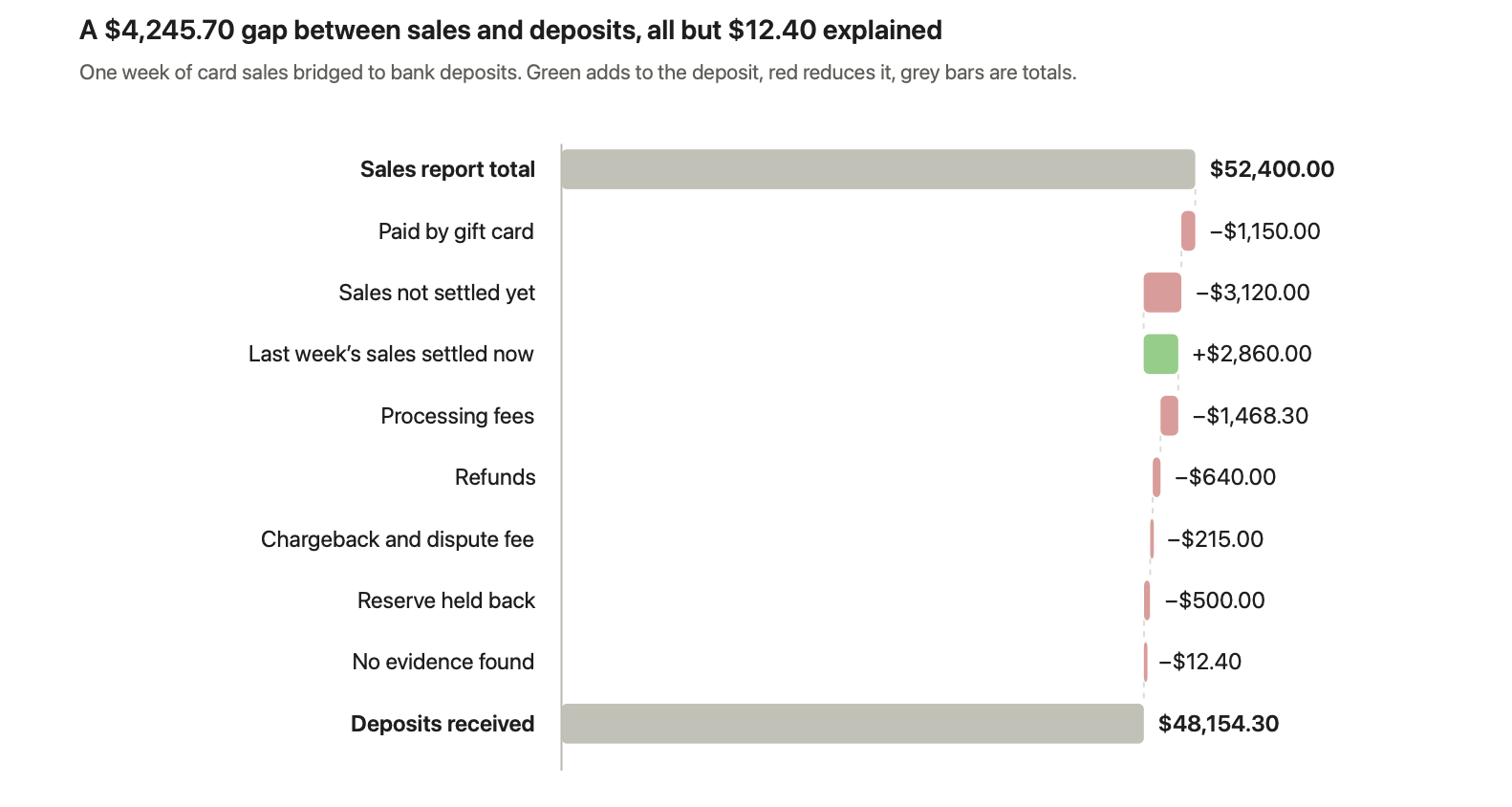
Your sales report says you sold $52,400 last week. Your bank received $48,154.30 from your payment processor. The $4,245.70 gap isn't missing money, and it isn't one fee. It's a mix of fees, refunds, a chargeback, a reserve, gift card sales the processor never handled, and sales that settled in a different week. Every finance team that takes card or online payments sees this gap, and most of it can be explained line by line.
This guide lists the 12 reasons payment settlements differ from sales reports, shows how to bridge one to the other, and walks through a worked example. It's written for controllers, accountants and finance operations leads at US businesses selling through Stripe, PayPal, Shopify, Amazon and card terminals. It builds on our step-by-step guide to payment reconciliation, and draws on Greenloom's work with 45 finance teams and more than 2,400 real payout mismatches.
Payment settlement definition
A payment settlement is the net amount a payment processor or marketplace pays into your bank for a group of transactions, after it deducts fees, refunds, chargebacks and reserves, on its own payout schedule. A sales report shows what you sold. Because the two measure different things at different times, they rarely match.
Key takeaways
- A sales report is gross and dated by order. A settlement is net and dated by payout. That alone explains most gaps.
- The biggest causes are fees, refunds, chargebacks, reserves and timing. Most are visible line by line in the settlement report.
- Sales reports often include payments the processor never handled, such as cash, gift cards or another gateway.
- Bridge the two with a written list of reconciling items, from the sales total to the deposit total.
- If a difference has no line in the settlement report to explain it, treat it as an exception, not a fee.
In this guide
- What is the difference between a settlement report and a sales report?
- Why do payment settlements differ from sales reports?
- How do you reconcile a settlement to a sales report?
- What does a sales-to-settlement bridge look like?
- How do Stripe, PayPal, Shopify and Amazon settlements differ?
- When is a settlement difference a real problem?
- How does Greenloom explain settlement differences?
- Frequently asked questions about settlements and sales reports
- Sources
What is the difference between a settlement report and a sales report?
A sales report shows what customers bought and when they ordered. A settlement report shows what the processor actually paid you, what it took out, and when the money left. They answer different questions, so they are built differently.
Sales report | Settlement report | |
|---|---|---|
What it shows | Orders and the amount customers were charged | Money paid to your bank and everything deducted from it |
Amounts | Gross, usually before fees | Net, after fees, refunds, chargebacks and reserves |
Dated by | Order or invoice date | Payout or settlement date |
Payment methods | Every method: cards, wallets, cash, gift cards, store credit | Only what that one processor handled |
Time zone and cut-off | Your store or ERP settings | The processor's settings and payout schedule |
Main ID | Order or invoice number | Transaction ID and payout or batch ID |
Who produces it | Your store, POS or ERP | Stripe, PayPal, Shopify, Amazon or your card processor |
The settlement report is the one that explains the gap, because it lists every transaction and deduction inside each payout. Stripe calls its version the payout reconciliation report.
Why do payment settlements differ from sales reports?
Payment settlements differ from sales reports for 12 common reasons. Seven come from how the processor pays you, four from how your sales report is built, and one is a genuine error.
1. Processing fees are taken out before you're paid
Card processors and marketplaces deduct their fees from each settlement, so the deposit is always lower than gross sales. Fees may be a percentage, a fixed amount per transaction, or both, and some are charged monthly rather than per payout.
How to spot it: fee lines or a fee column in the settlement report.
2. Refunds come out of later settlements
A refund is usually deducted from the next payout after it's issued, not from the payout that contained the original sale. A refund for a February order can reduce a March settlement.
How to spot it: refund lines with the original order or transaction ID.
3. Chargebacks reverse payments and add a fee
When a customer disputes a card payment, the amount is taken back, often with a dispute fee on top. Stripe, for example, debits your balance for the payment amount and a dispute fee. If you win the dispute, the money comes back in a later settlement.
How to spot it: dispute or chargeback lines, and a matching reversal if you win.
4. Settlements follow the processor's payout schedule
Processors don't pay you the moment a sale happens. Funds move from a pending to an available balance on a settlement schedule, and Stripe notes that refunds, disputes and fees come out of that same balance. Sales at the end of a week or month often land in the next one.
How to spot it: sales near the end of the period with no payout yet, and payouts at the start of the period for sales from before it.
5. Day cut-offs and time zones don't line up
Your store may close the day at midnight local time, while your processor closes it at a different hour or in a different time zone. A sale at 10 p.m. can land on one day in your sales report and the next day in the settlement.
How to spot it: small differences that move between consecutive days and cancel out over the week.
6. Many sales become one payout, or one payout becomes two deposits
A processor bundles hundreds of transactions into one payout, so no single sale matches the deposit. Occasionally one payout arrives as two bank deposits.
How to spot it: a payout or batch ID that groups many transactions, and deposits that only add up together.
7. Reserves and holds keep part of the money back
Some processors and marketplaces hold back part of your balance for a period to cover possible refunds or chargebacks, then release it later.
How to spot it: reserve, hold or "amount withheld" lines, and a matching release in a later settlement.
8. Your sales report includes payments the processor never handled
Sales reports usually include every payment method: cards, cash, gift cards, store credit, and other gateways or buy now, pay later providers. A processor's settlement only covers what it processed.
How to spot it: filter your sales report by payment method or gateway before comparing.
9. Some sales aren't settled yet
Payments that were authorized but not captured, are still pending, failed or were voided can appear in a sales report but never in a settlement.
How to spot it: orders with a payment status other than paid or captured.
10. Taxes, tips, shipping and discounts are reported differently
A sales report may show sales before tax, shipping or tips, or after discounts, while the settlement shows the full amount the customer was charged.
How to spot it: check which columns your sales report's total includes, and compare against the gross amount charged.
11. Currency conversion changes the amount
If you sell in one currency and settle in another, the conversion rate on the settlement date and any conversion fee make the deposit differ from the sales total.
How to spot it: a presentment currency and a settlement currency in the report, with a rate or conversion line.
12. Genuine errors
Not every gap is legitimate. Duplicate payouts, missing payouts and fees above the rate in your contract all happen. We look at where overcharges hide in why your payment gateway costs more than your contract says.
How to spot it: a difference left over after every report line has been matched.
How do you reconcile a settlement to a sales report?
To reconcile a settlement to a sales report, start from the sales total, remove what the processor never handled, adjust for timing, then subtract each deduction shown in the settlement report until you reach the amount deposited. Whatever is left is an exception. Accountants call this list a bridge.
- Pick one processor and one period. Use the same dates for the sales report, the settlement report and the bank statement.
- Filter the sales report to that processor. Remove cash, gift cards, store credit and other gateways.
- Remove sales that haven't settled yet. Sales near the end of the period that will be paid in the next payout are timing items.
- Add earlier sales that settled in this period. Sales from before the period that were paid during it.
- Subtract each deduction from the settlement report. Fees, refunds, chargebacks, reserves and currency conversion, each as its own line.
- Compare the result with the bank deposits. If they agree, the period is reconciled.
- Investigate what's left. A difference with no report line behind it is an exception. Check for duplicates, missing payouts and fees above your agreed rate before you write anything off.
The bridge is also the evidence. Keep it with the settlement report and bank statement so an auditor can follow every step.
What does a sales-to-settlement bridge look like?
A sales-to-settlement bridge starts at the sales report total and walks, one reconciling item at a time, to the deposits in the bank. Here is one week at a US e-commerce brand that takes card payments through one processor. The figures are illustrative, but every item is one controllers see each week.
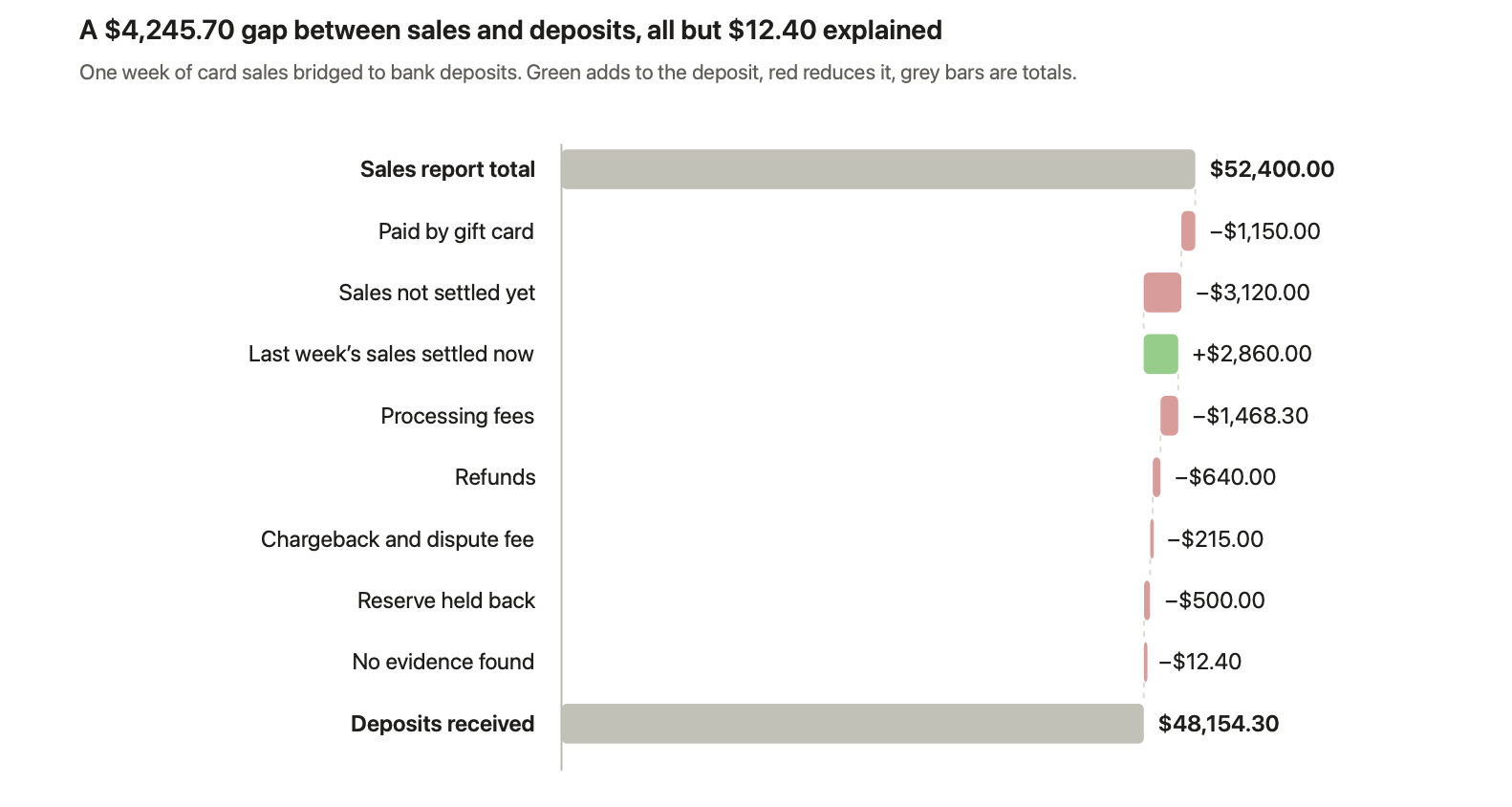
Eight of the nine items are explained by a line in the sales report, the settlement report or the bank statement. Only the last $12.40 has no evidence, so it goes to a person instead of being booked as a fee.
Line | Amount | Evidence that explains it | Reason from the list above |
|---|---|---|---|
Sales report total | $52,400.00 | Sales report for the week | Starting point |
Paid by gift card | −$1,150.00 | Payment method column in the sales report | 8 |
Sales not settled yet | −$3,120.00 | Sales on the last two days with no payout ID | 4 |
Last week's sales settled now | +$2,860.00 | Payout this week containing last week's transaction IDs | 4 |
Processing fees | −$1,468.30 | Fee lines in the settlement report | 1 |
Refunds | −$640.00 | Refund lines with the original order IDs | 2 |
Chargeback and dispute fee | −$215.00 | Dispute line for one order, plus the dispute fee | 3 |
Reserve held back | −$500.00 | Reserve line, to be released in a later settlement | 7 |
No evidence found | −$12.40 | Nothing yet: an exception for a person | 12 |
Deposits received | $48,154.30 | Bank statement | Reconciled except $12.40 |
See this on your own payouts.
Bring one month of sales, settlement and bank statements. In a 30-minute call, Greenloom builds this bridge live and shows you every reconciling item. Then use it free for 20 days. No card needed.
Reconcile my worst month live →
How do Stripe, PayPal, Shopify and Amazon settlements differ?
Each provider deducts slightly different things and groups payouts in its own way, so the same sales report bridges differently to each one. Exact fees and report names depend on your account, so check them against your own agreement.
Provider | What usually reduces the settlement | What to watch when reconciling |
|---|---|---|
Stripe | Processing fees, refunds, disputes and dispute fees, currency conversion | Match by payout ID using the payout reconciliation report, not by amount |
PayPal | Transaction fees, refunds, holds and reserves, currency conversion | Money can sit in your PayPal balance before it's transferred, so match transfers to the balance, not straight to sales |
Shopify | Processing fees, refunds, chargebacks, reserves | Shopify's sales reports can include other gateways and gift cards, so filter to the payments Shopify actually processed |
Amazon | Referral and fulfillment fees, refunds, reserves and other service fees | Each settlement covers a period of activity, so reconcile settlement by settlement, not day by day |
Card terminals and merchant accounts | Processing fees, chargebacks, batch timing | Some processors deduct fees from each batch, others bill them monthly in one debit |
If you take card payments through a terminal or merchant account, our page on credit card reconciliation software shows how batches, fees and chargebacks are matched.
When is a settlement difference a real problem?
A settlement difference is a real problem when no line in the sales report, settlement report or bank statement explains it, or when the explanation itself is wrong. Timing items should clear within a payout or two; anything that doesn't needs a closer look.
Normal, if it clears | Worth investigating |
|---|---|
Sales not yet settled at the end of a period | A payout that never arrives in the bank |
Fees that match your agreed rate | Fees above your agreed rate, or fees you don't recognize |
Refunds linked to real orders | Refunds nobody on your team approved |
A reserve that's released later | A reserve that keeps growing with no release |
Small day-to-day timing gaps that cancel out over the week | A gap that grows every period |
A chargeback you know about | The same payout or refund appearing twice |
One rule matters more than the rest: never assume a difference is a fee just because the amounts differ. If nothing in the settlement report explains it, treat it as an exception and find out why. The Association for Financial Professionals found that 76% of US organizations faced attempted or actual payments fraud in 2025, and unexplained gaps are where that shows up first.
How do you stop settlements and sales reports from drifting apart?
- Record sales gross and fees as an expense. Booking the net deposit as revenue hides fees and makes every bridge harder.
- Use a clearing account for each processor. Book sales into it and payouts out of it. It should return to zero, and whatever stays in it is your list of open items.
- Align the cut-off. Use the same day boundary and time zone in your sales reports and your processor settings where you can.
- Split sales reports by payment method. Compare each processor only with the sales it handled.
- Keep your rate card handy. Check fees against what you agreed, not just that a fee exists.
- Reconcile daily or weekly. A week's differences are far easier to explain than a quarter's.
Keep your ERP. Lose the spreadsheet.
Greenloom connects to your banks, Stripe, PayPal, Shopify and Amazon, bridges every payout to your sales daily, and sends your team only the exceptions to approve. No ERP changes. Try it free for 20 days on your own data. No card needed.
How does Greenloom explain settlement differences?
Greenloom explains settlement differences by matching every payout to the sales and deposits behind it each day, naming each reconciling item from the settlement report, and sending your team only the differences it can't prove. It runs alongside your ERP and is used by 45 finance teams.
- Connect. Banks, Stripe, PayPal, Shopify and Amazon. You can upload statements on day one. No ERP changes.
- Bridge and explain. Every payout is matched to its sales and its deposit, with each difference named: which fee, which refund, which chargeback, which reserve, which payout came in late or was split.
- Approve and post. Your team reviews a short list of exceptions. Only approved entries post to your ERP.
What Greenloom does
- Bridges every payout to sales and deposits, every day, not a sample.
- Breaks short payouts into fees, refunds, chargebacks, withholding tax, bank charges and FX.
- Flags fees above the rate you agreed.
- Holds duplicate, late and split payouts, and says why.
- Keeps an audit trail of what matched, what was held, who approved it and when.
What Greenloom does not do
- It doesn't assume a fee exists just because two amounts differ. Without evidence, the item stays open for a person.
- It doesn't post an entry without a yes from your team.
- It doesn't replace your ERP, your POS or your processor's reports.
See how it works on our payment reconciliation software page.
Bring your worst month. We'll reconcile it live.
Book a 30-minute call. We load one month of your sales, settlement and bank statements, and you see what matches, what doesn't, and why. Then use Greenloom free for 20 days on your own data. No card needed, and we reply within one business day.
Frequently asked questions about settlements and sales reports
Why is my settlement amount less than my sales?
Your settlement is usually less than your sales because the processor deducts fees, refunds, chargebacks and sometimes a reserve before paying you. Sales from the last day or two of the period may also be paid in the next settlement.
Why is my payout higher than my sales for the day?
A payout can be higher than one day's sales when it includes sales from earlier days, released reserves or a chargeback you won. Compare payouts with sales over the whole settlement period, not one day.
What is the difference between a settlement report and a sales report?
A sales report shows gross sales by order date across every payment method. A settlement report shows the net amount a processor paid you by payout date, with every fee, refund, chargeback and reserve deducted.
How long does it take for sales to settle?
It depends on your processor and account. Most card processors and online platforms pay out on a schedule of a few business days, and marketplaces often settle on a set cycle. Check your payout schedule in your provider's settings.
Why doesn't my Shopify payout match my sales report?
Shopify payouts are net of processing fees, refunds and chargebacks, and are paid on a schedule, while Shopify's sales reports can also include other payment gateways and gift cards. Filter the sales report to Shopify Payments and compare payout by payout.
Why doesn't my Stripe payout match my sales?
Stripe pays out your balance after deducting processing fees, refunds and disputes, and groups many payments into one payout. Its payout reconciliation report lists every transaction and deduction inside each payout.
Should I record sales gross or net of processing fees?
Record sales at the gross amount and processing fees as a separate expense. Recording only the net deposit understates revenue and hides what payment processing costs your business.
What should I do with a difference I can't explain?
Treat it as an exception, not a fee. Check for duplicates, missing payouts and fees above your agreed rate, ask the processor for detail, and keep the item open with an owner until it's resolved.
About the author
Siddika Shaikh is CEO and Co-founder of Greenloom, AI reconciliation software that matches bank, gateway and marketplace payouts to a company's ERP every day and sends finance teams only the exceptions. More articles by Siddika
Sources
- Stripe Docs, Payout reconciliation report
- Stripe Docs, Balances and settlement time
- Stripe Docs, Disputes
- Association for Financial Professionals, 2026 Payments Fraud and Control Survey Report
Updated
Comments
Join the conversation and share your thoughts with the community.
Community
Be the first to share your perspective.