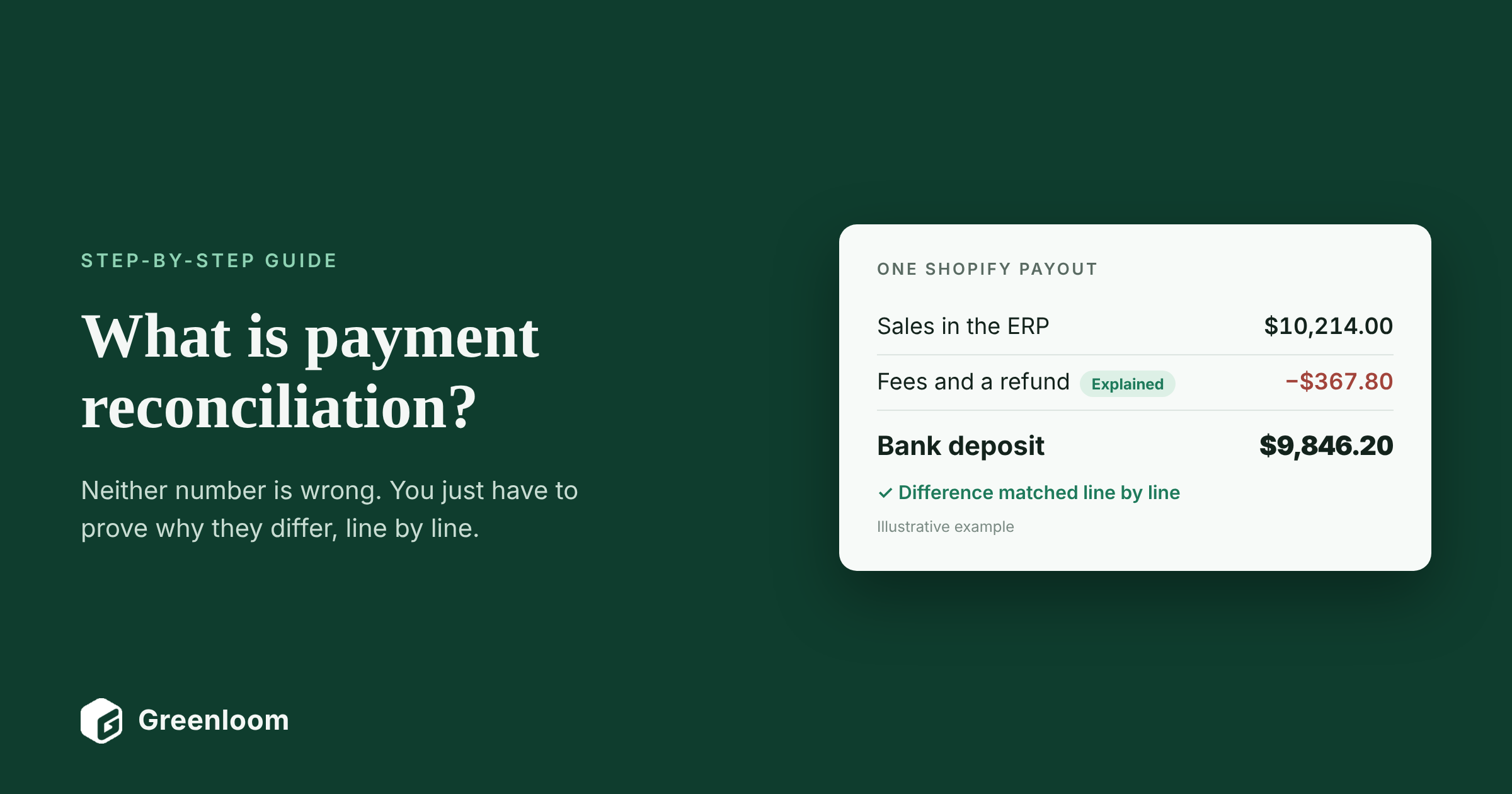
A Shopify payout of $9,846.20 lands in your bank account. Your ERP shows $10,214.00 in sales for the same days. Neither number is wrong, and nobody stole $367.80. The gap is fees and a refund. Payment reconciliation is how you prove that, line by line, before you close the month.
This guide explains what payment reconciliation is, how it differs from bank reconciliation, and how to do it step by step, with a worked example you can follow. It's written for controllers, accounting managers and finance operations leads at US businesses that get paid through card processors, marketplaces and bank transfers. Greenloom builds payment reconciliation software, and this guide draws on that work with 45 finance teams and more than 2,400 real payout mismatches.
Payment reconciliation definition
Payment reconciliation is the process of matching the payments recorded in your accounting system with the records from the banks, card processors and marketplaces that moved the money, then explaining every difference, such as a fee, refund, chargeback or timing gap, before the books are closed.
Key takeaways
- Payment reconciliation is a three-way match: sales in your books, the processor's payout report, and the deposit in your bank.
- Most differences are legitimate: fees, refunds, chargebacks, taxes and timing. The work is proving which is which.
- Record sales gross and fees as an expense. Booking net deposits as revenue hides what payments cost you.
- Reconcile daily or weekly if you take card or marketplace payments. Small gaps are much easier to explain while they're recent.
- Anything you can't explain with evidence is an exception for a person, not a rounding error to write off.
In this guide
- What is payment reconciliation?
- Why is payment reconciliation important?
- How do you do payment reconciliation step by step?
- What does payment reconciliation look like in practice?
- Why don't payments match your records?
- Should you reconcile payments manually or automatically?
- How does Greenloom automate payment reconciliation?
- What do common payment reconciliation terms mean?
- Frequently asked questions about payment reconciliation
- Sources
What is payment reconciliation?
Payment reconciliation is a type of financial reconciliation that checks every payment your business received or made against the records of the company that moved the money. For a business that sells online or in stores, that usually means three records of the same money:
- Your books. The sales, invoices and refunds recorded in your ERP or accounting system.
- The provider's report. The payout or settlement report from Stripe, PayPal, Shopify, Amazon or your card processor, showing what was paid and what was deducted.
- Your bank statement. The deposit that actually arrived.
When all three agree, or every difference has a supported reason, the payment is reconciled.
What is the difference between payment reconciliation and bank reconciliation?
Bank reconciliation compares your cash account with your bank statement. Payment reconciliation goes one level deeper and explains what is inside each deposit: which sales, which fees, which refunds. You can finish a bank reconciliation and still not know why a payout was short.
Bank reconciliation | Payment reconciliation | Invoice reconciliation | |
|---|---|---|---|
What it compares | Your cash account against the bank statement | Recorded payments against processor, marketplace and bank records | Invoices against the payments made or received for them |
Question it answers | Does our cash balance agree with the bank? | Does every payment and payout add up, and why not? | Has each invoice been paid in full, once? |
Typical source documents | Bank statement, general ledger | Payout and settlement reports, bank statement, sales records | Invoices, remittance advice, payment records |
Usual frequency | Monthly | Daily or weekly for high volumes | As payments arrive |
What are the types of payment reconciliation?
Payment reconciliation is usually split by where the money comes from, because each channel pays differently.
Type | What gets matched | What usually causes differences |
|---|---|---|
Card processor reconciliation | Card sales to settlement batches and deposits | Processing fees, refunds, chargebacks, settlement timing |
Marketplace reconciliation | Orders to Amazon or other marketplace settlements | Referral and fulfillment fees, refunds, reserves |
Digital wallet reconciliation | PayPal and wallet payments to transfers | Fees, holds, currency conversion |
Bank transfer and ACH reconciliation | Customer transfers to open invoices | Missing references, partial and lump-sum payments |
Accounts receivable reconciliation | Invoices to customer payments received | Short payments, deductions, withholding tax |
Accounts payable reconciliation | Supplier bills to payments sent | Duplicate payments, early payment discounts, bank charges |
This guide focuses on money coming in, which is where net payouts and missing references create most of the work.
Why is payment reconciliation important?
Payment reconciliation is important because revenue, cash and fees are only accurate once every payment is accounted for. Five things depend on it:
- Accurate revenue. If you book net deposits as sales, your revenue is understated and your fees are invisible. Reconciliation splits each payout into gross sales and the costs taken out of it.
- A faster close. Unexplained payout gaps are one of the most common reasons a month-end close runs late. Ventana Research found that 53% of companies complete their monthly close within six business days. Reconciling as you go is how teams get there.
- Fraud and error detection. Duplicate payouts, refunds nobody approved and missing deposits only show up when someone compares the records. The Association for Financial Professionals found that 76% of US organizations faced attempted or actual payments fraud in 2025.
- Fees you can recover. Processors and marketplaces deduct fees before they pay you. Without reconciliation, nobody checks those fees against your contract. We cover where they hide in why your payment gateway costs more than your contract says.
- A clean audit. Auditors want to see what supports each number and who approved it. For US public companies, Section 404 of the Sarbanes-Oxley Act requires management to maintain and assess internal control over financial reporting, and cash and payment reconciliations are standard controls.
How do you do payment reconciliation step by step?
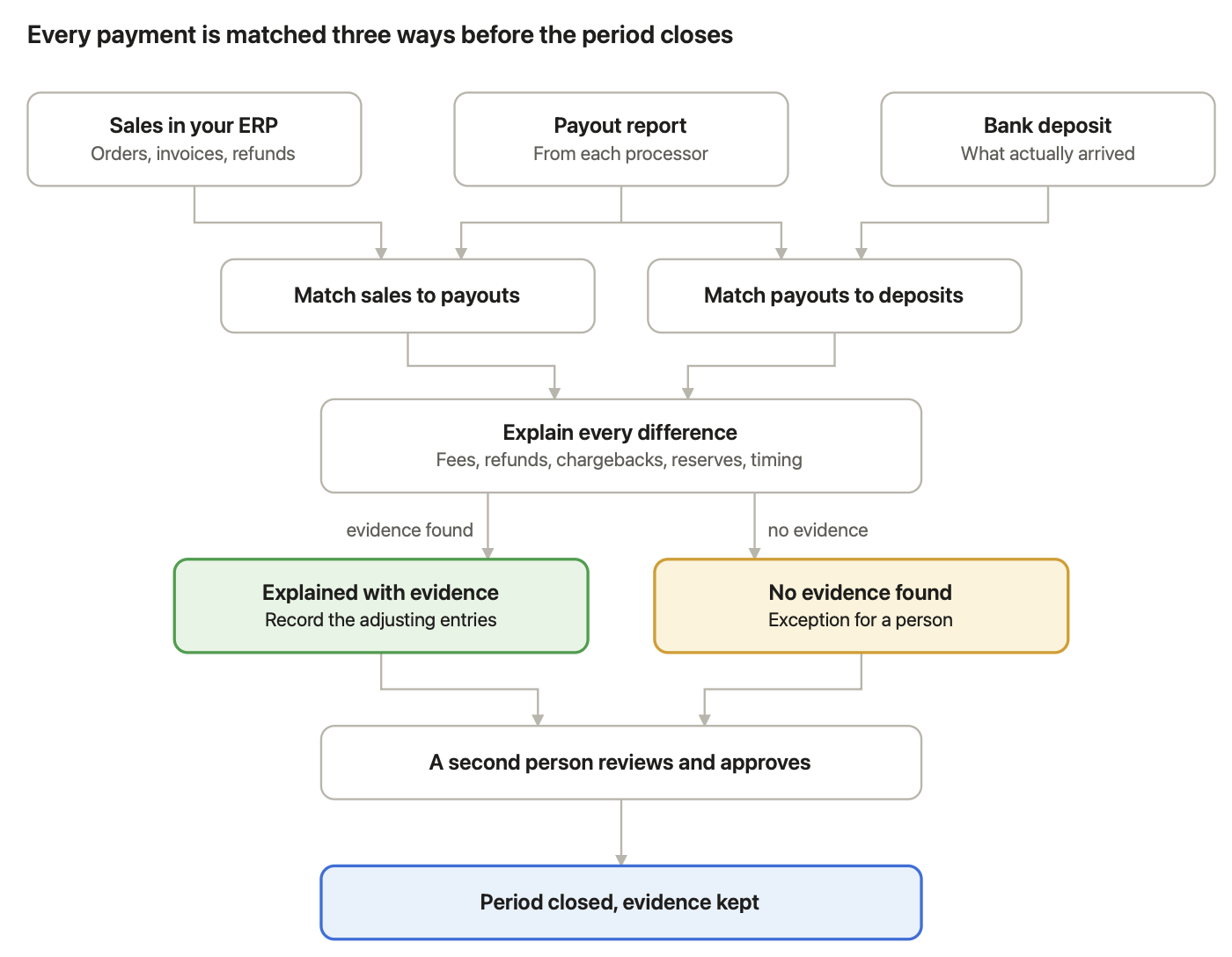
To do payment reconciliation, gather your sales, payout and bank records for the period, match sales to payouts and payouts to deposits, explain every difference with evidence, record the adjusting entries, and get the result reviewed. Here are the seven steps in order.
- Gather the records for the period. Export your sales and invoices from your ERP, the payout or settlement report from each provider (Stripe, PayPal, Shopify, Amazon and your card processor), and your bank statements. Use the same date range for all three, plus a few days after it for late deposits.
- Put them into one format. Each source formats dates, amounts and IDs differently. Line them up with the same columns: date, amount, currency, transaction or order ID, payout ID and type (sale, refund, fee, chargeback).
- Match sales to the provider's report. Pair each sale in your books with its transaction in the payout report, using the order or transaction ID. This is usually a one-to-one match.
- Match each payout to a bank deposit. Pair each payout total with the deposit that arrived in your bank, using the payout ID, amount and date. One payout usually covers hundreds of sales, and sometimes arrives as two deposits.
- Explain every difference. Use the settlement report to break each payout into its parts: gross sales, processing fees, refunds, chargebacks, reserves, taxes and currency conversion. Anything left over is an exception.
- Record the adjusting entries. Book fees as an expense, refunds and chargebacks against the original sales, and any money still in transit as a receivable. Don't book the net deposit as revenue.
- Investigate exceptions, document and approve. Chase what you can't explain with the provider or customer, attach the evidence to the reconciliation, and have a second person review and approve it before the period is closed.
Steps 3 to 5 are where most of the time goes. They're also the steps payment reconciliation software automates first
What does payment reconciliation look like in practice?
In practice, payment reconciliation turns one net deposit back into the sales and deductions behind it, then records each part in the right account. Here is the Shopify payout from the start of this guide, reconciled step by step. The figures are illustrative, but the pattern is the one US e-commerce teams see every week.
Your ERP shows 142 orders worth $10,214.00 for March 10 and 11. Your bank shows one deposit of $9,846.20 on March 13. Nothing in your books equals $9,846.20, so a simple match fails. The payout report explains it:
Line | Amount | Evidence | Result |
|---|---|---|---|
142 orders in the ERP | $10,214.00 | Order IDs in the payout report | Matched |
Processing fees | −$297.80 | Fee lines in the payout report | Explained |
Refund on one order | −$70.00 | Refund line with the order ID | Explained |
Deposit received March 13 | $9,846.20 | Bank statement | Matched to the payout |
The $367.80 gap is fully explained, so the payout is reconciled.
What journal entries does this payout need?
If you record card and online sales in a clearing account, the sales were booked when the orders were placed. The payout entry then clears that account and records the costs:
Account | Debit | Credit |
|---|---|---|
Bank | $9,846.20 | |
Payment processing fees (expense) | $297.80 | |
Sales returns and refunds | $70.00 | |
Shopify clearing account | $10,214.00 |
The clearing account returns to zero for these orders, revenue stays at the gross $10,214.00, and the $297.80 of fees is visible as a cost. Your accountant may use different account names, but the shape is the same.
What if the payout lands in the next month?
If these orders were placed on March 30 and 31 and the deposit arrived on April 2, the $10,214.00 would still be in the clearing account at March 31. That's correct: it's money in transit, not an error. Your March reconciliation lists it as a timing item, and the April payout clears it.
See this on your own payouts.
Bring one month of bank and payout statements. In a 30-minute call, Greenloom reconciles it live and shows you every fee, refund and timing item. Then use it free for 20 days. No card needed.
Reconcile my worst month live →
Why don't payments match your records?
Payments usually don't match your records because providers pay net, pay in batches and pay on their own schedule, not because something went wrong. Stripe, for example, explains that refunds, disputes and fees come out of the same balance that funds your payouts. Here are the most common causes and how to resolve each one.
Cause | What you see | How to resolve it |
|---|---|---|
Processing fees | Deposit is lower than sales | Take the fee lines from the payout report and book them as an expense |
Refunds | Deposit is lower, sometimes for an older sale | Link each refund to its original order, even across periods |
Chargebacks | Money and a fee taken back without warning | Link the dispute to the sale and track it until it's resolved; Stripe debits the payment amount and a dispute fee from your balance |
Batching | One deposit covers hundreds of sales | Match the payout to its transactions using the payout ID, not the amount |
Settlement timing | Sales in one period, deposit in the next | List undeposited payouts as in transit at the cut-off date |
Split payouts | One payout arrives as two deposits | Match both deposits to the same payout |
Reserves and holds | Part of the money is held back | Record the held amount and match it when it's released |
Currency conversion | Amounts differ by a small percentage | Use the rate on the payout date and record the FX difference |
Withholding tax and bank charges | Cross-border payments arrive short | Match the tax certificate and the bank's charge line to the gap |
Missing references | A transfer with no invoice number | Match on customer, date and amount, and confirm with the customer if two invoices fit |
Duplicates | The same payout or payment twice | Hold the second one and raise it with the provider |
Fees above your agreed rate | Fees larger than your contract allows | Compare the fee lines with your rate card and claim the difference back |
One rule matters more than the rest: never assume a difference is a fee just because the amounts differ. If no report line explains it, it's an exception for a person to investigate.
Should you reconcile payments manually or automatically?
You can reconcile payments manually in a spreadsheet when volumes are low and every payment carries a clear reference. Once you take money through two or more processors or marketplaces, automation usually pays for itself, because net payouts and timing differences multiply the manual work.
Manual payment reconciliation | Automated payment reconciliation | |
|---|---|---|
How matching works | Exports, VLOOKUPs and tick marks | Software matches sales, payouts and deposits by ID, amount and date |
Net payouts | Broken down by hand from the payout report | Broken into fees, refunds and chargebacks automatically |
How often it's done | Usually once a month | Daily, as data arrives |
What reaches your team | Every line | Only the exceptions the software can't explain |
Audit trail | Spreadsheets, emails and notes | A log of every match, explanation and approval |
When it breaks down | More channels, more volume, more people | When nobody reviews the exceptions |
AI-powered tools add one more layer: they investigate the payments rules can't match and explain each difference with evidence. Our guide to what AI reconciliation software is and how it works explains that layer in detail.
How often should you reconcile payments?
Reconcile payments at least monthly, and daily or weekly if you take card, marketplace or online payments every day. Differences are much easier to explain while they're a few days old, and chargebacks often have response deadlines that a monthly reconciliation can miss.
Your situation | Suggested frequency |
|---|---|
A few hundred payments a month, mostly bank transfers with references | Monthly |
Card or online payments every day through one processor | Weekly |
Several processors, marketplaces or locations | Daily |
Public company or preparing for an audit | Daily or weekly, with documented review |
What are the best practices for payment reconciliation?
- Record sales gross. Book the full sale as revenue and fees as an expense, never the net deposit as revenue.
- Use a clearing account per provider. It should return to zero as payouts arrive. Whatever stays in it needs an explanation.
- Reconcile at three levels. Sales to payouts, payouts to deposits, and fees to your contract.
- Set a tolerance, in writing. Decide what size of difference is immaterial, and review everything above it.
- Never carry an unexplained difference forward without an owner and a date.
- Separate duties. The person who prepares a reconciliation shouldn't be the one who approves it.
- Keep the evidence. Save the payout reports and bank statements with each reconciliation, so an auditor can trace any number to its source.
Keep your ERP. Lose the spreadsheet.
Greenloom connects to your banks, Stripe, PayPal, Shopify and Amazon, reconciles every payout to your ERP daily, and sends your team only the exceptions to approve. No ERP changes. Try it free for 20 days on your own data. No card needed.
How does Greenloom automate payment reconciliation?
Greenloom automates payment reconciliation by matching your bank, payment processor and marketplace payouts to your ERP every day, investigating the payments that don't match, and sending your team only the exceptions that need a decision. It works alongside the ERP you already run and is used by 45 finance teams.
- Connect. Banks, Stripe, PayPal, Shopify and Amazon. You can upload statements on day one. No ERP changes.
- Match and explain. Every payout is matched to its sales and its deposit, with each difference named: which fee, which refund, which chargeback, which payout came in late or was split.
- Approve and post. Your team clears a short queue. Only approved entries post to your ERP.
What Greenloom does
- Reconciles every payment, every day, not a sample.
- Breaks a short payout into processing fees, refunds, chargebacks, withholding tax, bank charges and FX.
- Flags fees above the rate you agreed.
- Matches payments with no reference, using customer, date and amount.
- Holds duplicate, late and split payouts, and says why.
- Keeps a live audit trail of what matched, what was held, who approved it and when.
What Greenloom does not do
- It doesn't replace your ERP or general ledger.
- It doesn't post an entry without a yes from your team.
- It doesn't assume a fee exists just because two amounts differ. Without evidence, the item stays open for a person.
- It doesn't reconcile company card spending or employee expenses.
See the full feature list on our payment reconciliation software page.
Bring your worst month. We'll reconcile it live.
Book a 30-minute call. We load one month of your bank and payout statements, and you see what matches, what doesn't, and why. Then use Greenloom free for 20 days on your own data. No card needed, and we reply within one business day.
What do common payment reconciliation terms mean?
Term | Plain-English meaning |
|---|---|
Chargeback | A card payment reversed by the customer's bank, usually with a dispute fee. |
Clearing account | A holding account for money between the sale and the deposit. It should return to zero. |
Deposit in transit | A payout that's been sent but hasn't reached your bank by the cut-off date. |
Exception | A difference that no evidence explains. It needs a person. |
Gross sales | The full value of sales before any fees or deductions. |
Net payout | What a provider actually pays you after fees, refunds and other deductions. |
Payout report | The provider's list of the transactions and deductions inside each payout. Also called a settlement report. |
Reserve | Money a provider holds back for a period to cover possible refunds or chargebacks. |
Three-way match | Matching sales in your books, the provider's payout report and the bank deposit. |
Tolerance | A small difference you've agreed to treat as immaterial. |
Frequently asked questions about payment reconciliation
What is payment reconciliation in simple terms?
Payment reconciliation is checking that the money you recorded matches the money your bank and payment providers say moved. Where the two differ, you find the reason, such as a fee, refund or timing gap, or flag it for investigation.
What are the steps of payment reconciliation?
Gather your sales, payout and bank records, put them into one format, match sales to payouts, match payouts to bank deposits, explain each difference, record the adjusting entries, and have the reconciliation reviewed and approved.
What is an example of payment reconciliation?
A Shopify payout of $9,846.20 is matched to 142 orders worth $10,214.00. The $367.80 difference is explained by $297.80 in processing fees and a $70.00 refund, both shown in the payout report, so the payout is reconciled.
What is the difference between payment reconciliation and bank reconciliation?
Bank reconciliation checks that your cash account agrees with your bank statement. Payment reconciliation explains what is inside each deposit, matching it to the sales, fees, refunds and chargebacks recorded by your payment providers.
Why doesn't my Stripe payout match my sales?
Stripe pays out your balance after deducting processing fees, refunds and disputes, and it groups many payments into one payout on its own schedule. The payout report lists each transaction and deduction, which is what you use to reconcile the difference.
How do you record payment processing fees?
Record the full sale as revenue and the processing fees as a separate expense when the payout arrives. Booking only the net deposit as revenue understates sales and hides what card and online payments cost your business.
How often should payment reconciliation be done?
At least monthly. Businesses that take card, marketplace or online payments every day should reconcile daily or weekly, because recent differences are easier to explain and chargebacks have response deadlines.
Who is responsible for payment reconciliation?
Usually an accountant or finance operations specialist prepares it, and a controller or accounting manager reviews and approves it. Keeping preparation and approval with different people is a basic internal control.
Can you do payment reconciliation in Excel?
Yes, for low volumes with clear references. Excel struggles once payouts bundle hundreds of sales, refunds cross periods and several providers report in different formats, which is when most teams move to software.
What is payment reconciliation software?
Payment reconciliation software automatically matches your recorded sales and invoices to payout reports and bank deposits, breaks out fees, refunds and chargebacks, and sends only the unexplained differences to your team for review.
About the author
Siddika Shaikh is CEO and Co-founder of Greenloom, AI reconciliation software that matches bank, gateway and marketplace payouts to a company's ERP every day and sends finance teams only the exceptions. More articles by Siddika
Sources
- Ventana Research, Best Practices for a More Effective Close
- Association for Financial Professionals, 2026 Payments Fraud and Control Survey Report
- U.S. Securities and Exchange Commission, Sarbanes-Oxley Section 404: A Guide for Small Business
- Stripe Docs, Balances and settlement time
- Stripe Docs, Disputes
Updated

Comments
Join the conversation and share your thoughts with the community.
Community
Be the first to share your perspective.